Lifeline National Verifier Application Form: How to Apply, Check Status, and Choose a Provider
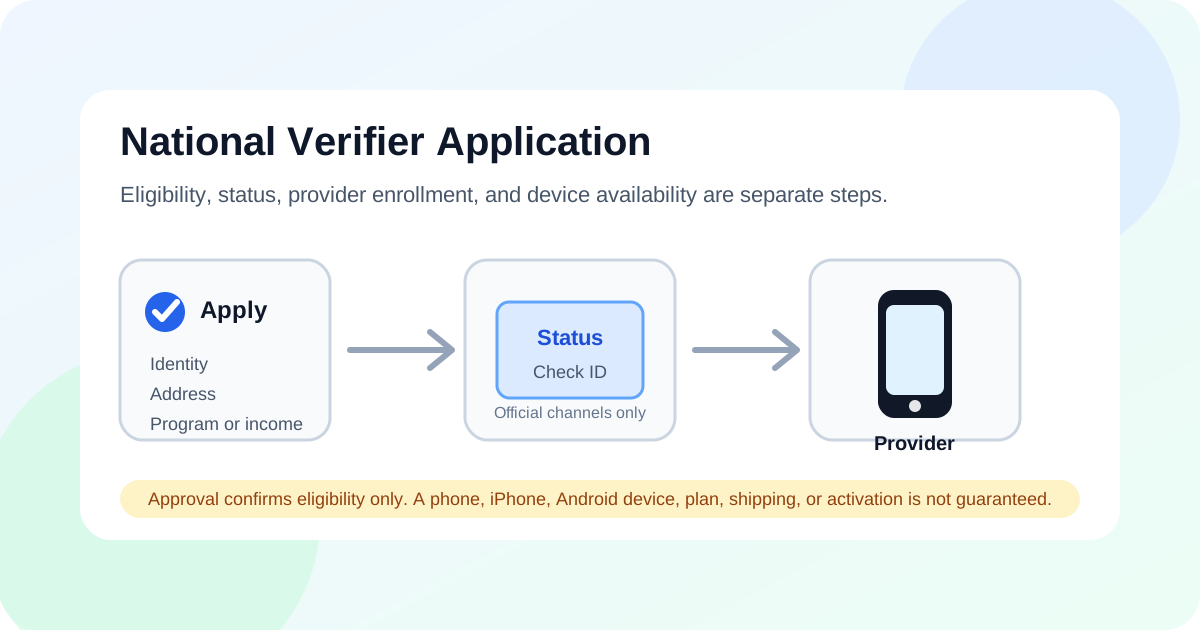
The Lifeline National Verifier application form is used to check whether a household may qualify for the federal Lifeline benefit. You can usually apply online through official Lifeline/National Verifier channels, by mail, or through a participating Lifeline provider. Approval confirms eligibility only; it does not guarantee a free phone, iPhone, Android device, plan, shipping, or activation. ApplyFreePhone.com is an independent informational website and is not a government agency, the FCC, USAC, Lifeline, the National Verifier, or a phone provider.
- The National Verifier checks whether your household may qualify for the federal Lifeline program.
- The form may ask for identity, address, household, program, income, or document information.
- Use official Lifeline/National Verifier channels or trusted participating providers.
- Approval is not a phone or device guarantee.
- After approval, you still need to choose a participating provider available in your ZIP code.
What Is the Lifeline National Verifier Application Form?
The National Verifier is the eligibility-check system used for the Lifeline program overview in many places. The application form, often accessed through official Lifeline/National Verifier channels or a participating provider's enrollment flow, collects information needed to decide whether a household may qualify.
- The National Verifier checks whether a household may qualify for Lifeline.
- Lifeline is the active federal phone and internet discount program.
- The form collects identity, address, household, and eligibility information.
- The form does not guarantee a free phone, iPhone, Android phone, provider approval, shipping, or activation.
- ACP ended, and households stopped receiving ACP discounts on June 1, 2024. Do not confuse ACP with Lifeline.
Fast Facts About the National Verifier Application
| Question | Short answer |
|---|---|
| What does it check? | Whether your household may qualify for Lifeline. |
| Is it a provider? | No. It checks eligibility; a provider handles service enrollment. |
| Does approval mean I get a phone? | No. Phone offers depend on provider availability, state, ZIP code, eligibility, and inventory. |
| Can I apply online? | Many users can start through official Lifeline/National Verifier channels or through a participating provider. |
| Is ACP the same thing? | No. ACP ended; Lifeline is a separate active program. |
For a wider checklist of income and program rules, see our Lifeline eligibility requirements. For local service options, you can also find provider availability by state before choosing a company.
Who Should Use the National Verifier Application?
The National Verifier application is for households that want their Lifeline eligibility checked or confirmed. You may want to use it if:
- You are applying for Lifeline for the first time.
- A provider asked you to verify eligibility before activating service.
- You want to confirm eligibility before you compare Lifeline providers.
- You want to avoid fake application pages or scam forms that ask for sensitive details.
What Information Do You Need for the Lifeline Application Form?
The exact fields can vary by state and by whether you apply online, on paper, or through a provider. In most cases, you should be ready to share the following:
| Information needed | Why it may be needed | Important note |
|---|---|---|
| Full legal name | To match identity records | Use the name shown on official documents. |
| Date of birth | To confirm identity | Must match your application information. |
| Home address | To check household and service area | Use your real residential address. |
| Last 4 digits of SSN or Tribal ID if requested | Identity verification | Only enter this on official application pages. |
| Eligibility program or income details | To show why you may qualify | Examples may include SNAP, Medicaid, SSI, Federal Public Housing Assistance, Veterans Pension, or qualifying income. |
| Documents if automatic check fails | To prove eligibility manually | Upload only through official or provider-approved channels. |
How to Complete the Lifeline National Verifier Application Form
Use these visible steps as a general walkthrough. Always confirm current instructions through the official Lifeline application or your chosen provider.
Step 1: Start with the official Lifeline application path
Use official Lifeline and National Verifier channels, such as the checklifeline.org application flow, or a trusted participating Lifeline provider's enrollment flow. ApplyFreePhone.com is informational only and is not affiliated with the FCC, USAC, Lifeline Support, or any provider.
Step 2: Enter your personal and household details
Enter your full legal name, date of birth, and home address exactly as they appear on official documents. Consistent details across systems help the automatic check confirm your information faster.
Step 3: Choose your qualifying program or income option
Eligibility can be based on a qualifying federal assistance program or on household income, depending on current Lifeline rules. See our full Lifeline eligibility requirements guide for the program list and income context.
Step 4: Upload documents if requested
If the automatic database check cannot confirm a detail, you may be asked to upload supporting documents. Common categories include:
- Proof of identity
- Proof of address
- Proof of program participation
- Proof of income
- Proof of life if requested by official verification systems
Step 5: Submit the application and keep your status details
After you submit, the National Verifier reviews your application. Keep any application ID, confirmation number, reference number, mailed notice, or provider status note you receive. Possible results include:
- Approved
- More information needed
- Not eligible
- Application pending review
Step 6: Choose a Lifeline provider after approval
Approval is not the same as receiving a phone. You still need a participating provider available in your ZIP code. Phone model, Android device, iPhone availability, plan features, shipping, and activation depend on the provider. Once eligible, review how to apply for a free phone after eligibility approval with a participating Lifeline company.
Online Application vs Paper Form
| Option | Best for | What to know | Status/check note |
|---|---|---|---|
| Online National Verifier application | Faster eligibility check | May give quicker status updates. | May be easier to check or correct. |
| Paper application form | Users who cannot apply online | Takes longer and must be mailed correctly. | Decision may come by mail and can take longer. |
| Provider-assisted application | Users applying through a Lifeline company | Provider may guide the process, but eligibility still depends on verification. | Ask the provider how to check status and what reference number to keep. |
National Verifier Application ID and Status Check
Depending on whether you applied online, by mail, or through a provider, you may need an application ID, confirmation number, reference number, mailed notice, or provider status information to check what happened next.
Check status only through official Lifeline/National Verifier channels or through the trusted provider you used to apply. If an application is pending or asks for more information, you may need to submit clearer documents or correct mismatched identity, date of birth, address, household, program, or income information.
Never enter SSN, Tribal ID, Medicaid/SNAP, income, or document details on suspicious pages promising guaranteed free phones, guaranteed iPhones, instant approval, or no eligibility check. Use official channels or a trusted participating provider only.
What Happens After National Verifier Approval?
- Approval confirms Lifeline eligibility for a limited process window.
- You still need to enroll with a participating provider.
- Provider availability depends on ZIP code and state.
- Device inventory varies and changes throughout the year.
- A free Android phone may be more common than a free iPhone, but neither is guaranteed.
- Some providers may offer SIM-only service or a discounted plan instead of a free device.
Before choosing a company, compare available service areas and plan details. You can compare Lifeline providers, find provider availability by state, and review cautious free Android phone options without assuming a specific device is guaranteed.
National Verifier Approval vs Provider Enrollment
| Step | What it means | What it does not mean |
|---|---|---|
| National Verifier approval | Your household may qualify for Lifeline. | You automatically receive a phone. |
| Provider enrollment | A participating provider checks service options for your ZIP code. | Every provider or device is available everywhere. |
| Device or plan offer | The provider explains current service, SIM, phone, shipping, and activation options. | A free iPhone, Android phone, or specific model is guaranteed. |
| Activation | The provider completes setup if you qualify and accept the offer. | Same-day activation or delivery is guaranteed. |
Common Reasons a Lifeline Application Gets Delayed
- Name, date of birth, or address does not match records.
- Application ID or status information was lost.
- Uploaded document is hard to read, cropped, expired, or does not match the applicant.
- The household/address needs duplicate-benefit review.
- The applicant already has Lifeline in the household.
- The user mixed ACP information with Lifeline information.
- A provider enrollment step was not completed after eligibility approval.
- The selected provider does not serve the ZIP code.
- The user applied through a suspicious or unofficial form.
Safety Warning: Avoid Fake National Verifier Forms
- Be suspicious of pages that promise "guaranteed approval," "free iPhone for everyone," "instant approval," or "no eligibility check."
- Do not submit SSN, Tribal ID, Medicaid/SNAP, income, or document uploads unless you are on an official Lifeline/National Verifier page or a trusted participating provider page.
- ApplyFreePhone.com does not collect Lifeline application data.
- Verify provider and application pages before submitting personal information, and review our guide to avoid Lifeline and free phone scams.